Archive for 2010
Cars Built Since 2008 Have Tire Pressure Warning Lights
By Chad Upton | Editor
Last week, I was driving behind a car with a tire that was nearly flat. The tire was so low, it was almost riding on the rims.
At the next red light, I waved at the driver and they opened their window. They put their cell phone down while I told them about the tire. They were surprised, thanked me and went back to talking on their phone. Even though there was a service station across the street, where they could have easily added air or at least checked the tire, they drove off like nothing was wrong.
I was shocked.
Apparently, some people don’t understand how dangerous a flat tire can be, not to mention the poor gas mileage and possible damage to your wheel. In fact, it’s not just this person. 33% of drivers don’t know what the tire pressure monitoring system (TPMS) warning light is when it lights up on their dashboard.
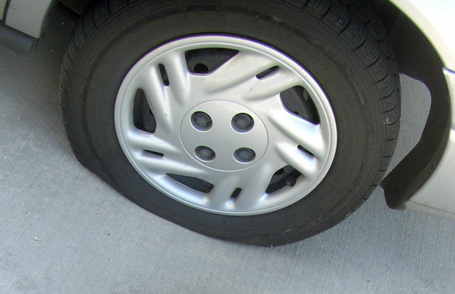
Since 2008, all cars in the US are required to have a tire pressure monitoring system. Many cars, especially luxury cars and SUVs, have had them for longer, but the importance of these systems became clear during the Bridgestone/Firestone Tire debacle in the year 2000. Some sources report there may have been as many as 250 deaths and 3000 catastrophic injuries from under-inflated tires and that tire pressure monitoring systems could have saved lives and reduced injuries.
 The tire pressure monitoring system will illuminate an icon on your instrument cluster when the pressure in any tire drops more than 25% below the recommended inflation level. The icon is a cross section of a bulging tire with an exclamation point inside of it.
Some cars have more advanced systems that will identify which tire is under-inflated. The more advanced systems can also tell you if a tire is over-inflated and when it is just a warning that can be addressed soon or if it is an emergency that requires immediate attention.
As the seasons change and the weather gets warmer or cooler, tire pressure changes too — that’s a good time to pay extra attention to tire pressure. If your vehicle warns you of a tire pressure problem, you should pull over to check the tires. This could really be a life saver, especially if you’re driving at highway speeds when the light comes on.
Whether you have this light or not, you should check your tire pressure regularly, and especially if they’re bulging. Most service stations have an air compressor to fill your tires, many of these are equipped with a pressure gauge that you can use without turning on the compressor (which costs money in some cases). Otherwise, the service station may be able to lend you a gauge.
On the inside of the driver’s door frame, there is usually a sticker that indicates the proper tire pressure for your vehicle. If not, check your manual.
Your manual will also tell you how to calibrate the tire pressure monitoring system. If your system is capable of telling you which tire is improperly inflated and you check the pressure in that tire, only to find that it is perfect, then your tires were probably rotated without calibrating the system to match the new tire locations.
Some systems use wireless sensors on each wheel, these are known as direct measurement systems and they are more expensive. The other main type of system relies on the ABS sensors to determine that one wheel is turning at a slightly different speed, indicating it is low. This system is cheaper, but it only works when the vehicle is in motion.
Broken Secrets
Subscribe on: Facebook | Twitter | Kindle
Sources: Jalopnik, Firestone Tire Recall, USA Today, NHTSA
Photo: jronaldlee (cc), dimmerswitch (cc)
Sherlock Holmes’ Famous Saying Wasn’t Part of the Original Works
By Kaye Nemec
The fictional character, Sherlock Holmes, was brought to life in 1887 by Sir Arthur Conan Doyle who authored 56 short stories and 4 novels about Holmes. The majority of the stories, all but 4, were narrated by Holmes’ fictional friend, Dr. Watson. The stories were hugely popular and the last one was published in 1927, they were and even still are adapted to stage and screen.
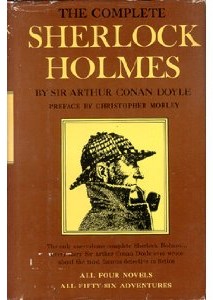 Even if you haven’t read any Sherlock Holmes stories, you’ve probably heard people quote Holmes’ popular phrase, “Elementary, my dear Watson.” Although this quotation is synonymous with Sherlock Holmes, it was not written by Sherlock Holmes author Conan Doyle.
The phrase was written by P. G. Woodhouse in his novel, Psmith Journalist in 1915. Its next known use was at the end of the film The Return of Sherlock Holmes (1929) which was the first Sherlock Holmes film with sound. The phrase grew in popularity from there, through various radio, screen and stage shows.
Not once in any of the 60 Sherlock Holmes’ stories written by Conan Doyle does Holmes say the exact words, “Elementary, my dear Watson.” He often refers to his more logical conclusions as “elementary” and, once in a while, he does refer to Dr. Watson as “my dear Watson” but he never used them together.
David Shore, creator of the popular TV medical drama House, pays homage to Sherlock Holmes throughout the series. For example, Sherlock Holmes lived at 221B Baker Street and the main character in the show, Dr. Gregory House, lives in apartment 221B. Holmes occasionally used cocaine; House was addicted to Vicodin until season 6. Shore also says he chose the name House because it was a play on the name Holmes. In addition, both Holmes and House have only one true friend. Holmes has Dr. Watson and House has Dr. Wilson.
Broken Secrets
Subscribe on: Facebook | Twitter | Kindle
Sources: Wikipedia (Sherlock Holmes), Wikipedia (Gregory House), Wikipedia (PSmith, Journalist), FactsMonk.com
eInk Doesn’t Use Power to Maintain an Image
By Chad Upton | Editor
eInk or electronic paper, is a modern display screen technology used in consumer electronics.
The most popular products that use electronic paper screens are eReaders such as the Amazon Kindle, Barnes and Noble Nook and Sony eReader.
When you first see an electronic paper display, the most striking thing is how much it looks like real paper. Not so much in texture, but definitely in readability. That’s because there really is an inky black dye inside the screen. Electronic paper displays are the perfect screen type for eReaders, for two main reasons.
 Electrical charges repel particles, forcing the ink near top of screen where it appears black, or toward the bottom of the display where it appears white. This provides very sharp text, just like a real book. It also means the display reflects light the same way a real book does, rather than generate its own light like typical television and cell phone display technologies. This makes the electronic paper easy on the eyes over long periods of time and easy to read in sunlight.
The surprising thing about this technology is that is doesn’t use any energy to hold a static image on the screen — it only requires energy while drawing a new image on the screen. This is perfect for devices that don’t require the display to be updated constantly, such as eReaders. Even if you’re a very fast reader, it’s going to take you at least 10 seconds to read a page. That means you’re only using the battery for a fraction of a second to update the display and then the battery can mostly rest until the next page turn.
That is great, because it means the battery last for a very long time. It also means that the display shows an image when the device is off and not consuming power. When the Kindle battery dies, it switches the screen to indicate the battery is dead. So, even though you can’t turn it on, you know exactly why.
One of the main drawbacks is that electronic paper is a black and white technology. Technically, color ePaper exists, but it is not in widespread use. Additionally, the screen refreshes slowly when compared to other display types, such as LCDs.
Slow refresh is no problem for eReaders, it can paint a new page on the screen faster than you can turn a page of a real paper book. But, it’s not good for devices that require motion graphics. Amazon is working on games and applications to run on the Kindle, similar to iPhone and BlackBerry apps. But, you won’t likely see any fast action games on electronic paper devices anytime soon.
Broken Secrets
Subscribe on: Facebook | Twitter | Kindle
Sources: Wikipedia (Electronic Paper, Kindle)
Air Conditioning Affects Gas Mileage
By Chad Upton | Editor
In most cars, the air conditioner’s compressor is powered by a drive belt on the engine. When the air conditioner is activated, the compressor adds resistance to your engine. That extra resistance means your engine requires more fuel to turn at the same speed.
In other words, using your air conditioner burns more gas than not using it. Modern cars have very efficient air conditioners, but this truth still stands.

On a hot summer day, you have to keep cool. Does that mean it’s more fuel efficient to drive with your windows down?
Yes and no.
The Society of Automotive Engineers performed a study that examined this question in detail. They performed wind tunnel and track experiments comparing a car and an SUV. With the windows down, the car was half as efficient at 50 mph (80 km/h) than the SUV’s at 30 mph (50 km/h). It’s clear that driving the car with windows down has a dramatic effect on fuel economy, but it affected the SUV even more, especially when a 10 mph (16 km/h) crosswind was added in the wind tunnel.
Consumer Reports found that below 40 mph (65 km/h), drivers are better off with their windows down and air conditioner off.
Jason Toews from GasBuddy.com found at speeds above 45 mph (70 km/h), “wind drag becomes an issue.” He says, “Drive at speeds over 55 mph with windows down and you’ll decrease fuel economy by up to 20 percent or greater.”
Myth Busters has also looked at this issue on a couple occasions. The first time around, their methodology was flawed, so they tried it a second time. The second time, they came to the same conclusion as Consumer Reports and GasBuddy, that windows down are more efficient than running the air conditioner at speeds less than 45-55 mph (70-90 km/h) and the drag at higher speeds makes the air conditioner the more efficient option.
Of course, results vary by vehicle.
There are many factors other than windows and air conditioning that affect fuel economy: drive train, power-train, body aerodynamics and tire rolling resistance. If you want to know exactly how it affects your car, you might try experimenting for yourself. Some cars have a driver information center that displays fuel economy, otherwise you could order an after market product, such as CarChip Pro ($75-$85), which may help you get that data. If you’re interested, some of these are explored in more detail in another post, The Ideal Vehicle Speed for Best Fuel Economy.
If it’s hot outside, you should probably start with your windows down anyway. This gives your air conditioner a bit of a break by clearing the extremely hot air out of the car first.
Do prefer windows down or the air conditioner on?
Broken Secrets
Subscribe on: Facebook | Twitter | Kindle
Sources: SAE (PDF), MythBusters (Ep 22, Ep 38), Edmunds, Bankrate, Consumer Reports, Missouri Gov
Photo: Tomás Fano (cc)
How to Take the Bone Out of a Chicken Wing
By Chad Upton | Editor
When we want to know how to do things right, we look to the professionals.
For example, if you want to peel a banana easily and with minimal strings, you’d learn how a monkey does it.
The same goes for eating chicken wings. There are plenty of professional food eaters, who win contests by eating food as quickly as possible. Some of these techniques were developed by them.

Here’s one great way to get the bones out of a wing:
Here’s a way to eat it with one hand, keeping your other hand free for your 6 shooter, beer mug or tums. You can skip to the 20 second mark on this one:
For those reading this on a device that doesn’t support video, the first video demonstrates removing the bones from a flat chicken wing. Grab the smaller bone and twist it back and forth a couple times, then pull it out. Then do the same for the larger bone, you’re left with all meat and no bones. The second video shows a man placing an entire flat wing in his mouth, biting down and pulling the chicken off the bones and he pulls it out of his mouth.
Thanks to Janine for suggesting this one.
Broken Secrets
Subscribe on: Facebook | Twitter | Kindle
Photo: Charles Haynes (cc)
Why Some Knives Have Serrated Blades
By Chad Upton | Editor
Good knives are expensive, but they’re money well spent when you consider they may outlive you.
There aren’t many purchases you can say that about and like anything that lasts, they need care and attention.
In fact, Japanese samurai swords endured hundreds of years of use, when properly cared for by a Togi professional — a sword polisher whose apprenticeship lasts ten years.
You’re probably aware that knives need sharpening, but do you know why they get dull in the first place?

It’s not just from repeated use, but from repeated misuse. Some misuse is expected, especially with serrated knives.
When you cut on a surface that is harder than the knife blade, that surface dulls the blade by creating a microscopic flat surface on the bottom of the blade. The flat surface is too small to see, but it makes a big difference in the cutting ability of the blade. In knife manufacturing, electron microscopes are used in quality control to inspect the sharpness of the blade.
To keep your knives sharp, it is best to cut on cutting boards made from soft materials such as various types of wood or plastic. While it’s convenient to cut directly on solid surface counter-tops such as granite and quartz, it’s not good for your knives and neither are glass cutting boards.
Plates are a common surface to cut on, but they’re bad for knives. Serrated blades help solve this dilemma; the points touch the plate but the raised edges above the points do not. Therefore, the points are dulled, but the other edges stay sharp.
Serrated blades also work well for cutting through hard rinds of some produce, and crunchy bread crusts too. The sharp points add more localized pressure, allowing better cutting penetration on the foods and act like a saw when the knife is moved back and forth.
There are other practices that can dull your knives too. Letting the cutting edge bang into other utensils in a drawer or the dishwasher can cause nicks and scratches, which adversely affect the knives’ sharpness.
To keep your knives in good repair, you should use a honing steel on the blade for about 30 seconds before each use. It helps remove scratches and bends in the blade, but it does not sharpen it.
For sharpening, a good manual or automatic sharpener should be used every few months. Professional sharpening should be done every few years. Many serrated blades cannot be sharpened, but a honing steel can be used on some.
Broken Secrets
Subscribe on: Facebook | Twitter | Kindle
Sources: Cutco, Electric Knife Sharpeners Blog, Sword Forum Mag, Wikipedia (Serrated Blade)
Your Dryer’s Lint Filter Should Be Washed
By Kaye Nemec | Contributor
Hopefully, you already know you need to clean the lint filter in your dryer after every couple uses. This maximizes efficiency and reduces a potential fire hazard. But, did you know that washing your lint filter every six months can further improve the performance of your dryer and also increase its lifespan?
A standard, tumble dryer has a fan that pulls fresh air into the dryer where it is heated to evaporate the moisture in your clothes. The warm air and the moisture then pass through
your lint filter where anything that was picked up with the tumbling motion is trapped. From there, the air is sent outside and the cycle starts over again with fresh air.
If you don’t clean your lint filter between uses, the flow of this moist, warm air is restricted and your dryer is much less efficient. What you probably didn’t know is that
the dryer sheets you throw in with each load of wet clothes are covered with a silicone based film that, overtime, also builds up on your lint filter and causes your dryer to work less efficiently.
Don’t believe me? Take your lint filter out and run some warm water over it. Is it pooling up on top and not draining through? Is there just a slow trickle of water passing through the screen? Odds are, the water is not rushing through as it would on a normal screen.
To wash your lint filter, try the following:
- Remove your lint filter from your dryer.
- Wash the screen with warm soapy water. You can use a soft brush (an old toothbrush works) but don’t put too much pressure on the screen.
- Hand dry the screen and leave it out until it’s completely dry.
- Reinstall the filter into your dryer.
You can clean your filter as needed or every 6 months to a year.
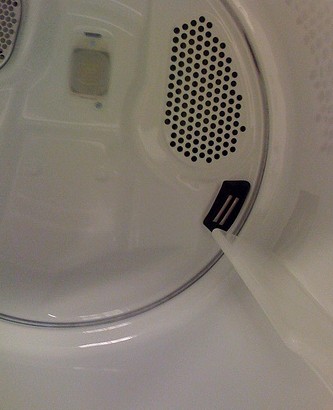
Some dryers also have moisture sensors (the black object in the photo) and the film can build up on those as well. To make sure your sensor continues to work efficiently, you can clean it with a little bit of detergent and a soft brush.
With the variety of dryers available today, you should confirm the manufacturer’s cleaning recommendations in your owner’s manual first.
Broken Secrets
Subscribe on: Facebook | Twitter | Kindle
Sources: Snopes.com, eHow.com
Photo: p0ps Harlow (cc)
How to Increase Mobile Phone Battery Life
By Chad Upton | Editor
Sometimes, you’re far from your charger and won’t be back anytime soon. Here are some tips to extend your battery when it’s running low.
Not all of these tips will apply to all phones, so use the ones that match the features on your phone. If your phone, camera or other gadgets frequently run out of power while you’re away from an outlet, consider an economical backup battery charger.
Turn Off 3G and Data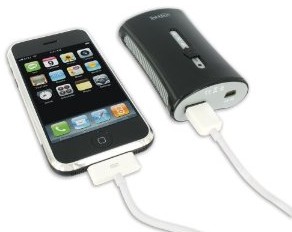
Most data capable phones can operate in different modes. If you turn off the high-speed wireless data mode, such as 3G, you will significantly reduce the power your phone consumes. This is the single biggest thing I find affects battery consumption.
Dim the Screen
The screen’s backlight uses a lot of power, keeping it off as much as possible will extend battery life. On the iPhone, press the top button, on many BlackBerrys, press ALT + ENTER to lock the keyboard and shutoff the screen. If your phone has an option to adjust the brightness, dim it. If it has auto-brightness, enable it. If you can set an “auto off” time then set it to the shortest time allowed.
Text Message Instead of Calling
If you can get away with communicating by text message, this can save power too. Although, it does require your screen, so short messages are better. These messages are embedded in the signals that your phone is already sending and receiving to normally communicate with the mobile network, even when you’re not using the phone, so it’s a very efficient way to communicate.
Turn Wifi and Bluetooth Off
Wifi and Bluetooth are great conveniences, but when you’re away from your charger and worried about losing phone capabilities, they’re a luxury that can go. Most phones with these features, have an option to disable them.
Don’t Play Games or Music
Well designed mobile phone processors have a low power mode that sips power when the phone is waiting for incoming calls in standby mode. Playing games requires the processor to work at its limit, which requires a lot more energy than standby mode. The same goes for playing music, especially if they’re compressed, high bit-rate or encrypted or drm protected music files — extra processing is needed to process these files and power the headphones or internal speaker.
Stop Background Apps
Some background apps use more power than others, it really comes down to the hardware in the phone the app is using (ex GPS) and how processor intensive the activity is.
Generally, if you’re trying to save power, closing the apps you don’t need can save power. This mostly applies to BlackBerry, Android and Windows Mobile devices.
It isn’t as important on iPhone since background apps aren’t true background apps, they have limited capabilities and therefore don’t consume a significant amount of battery power. That said, if you have a GPS tracking, VOIP or a music playing app running in the background, it could use significant amounts of power over long periods of time and it should be closed.
If you have any other ideas, drop them in the comments. Thanks to Kraig Brachman for suggesting this secret.
Broken Secrets
White Chocolate is Real Chocolate
By Chad Upton | Editor
Somebody once told me that White Chocolate is not really chocolate. The argument is that white chocolate is not made from chocolate liquor and white chocolate does not contain cocoa solids; therefore, it is not real chocolate.
That is not necessarily true.
 Chocolate was discovered by Aztecs in Central Mexico, at least three hundred years ago. The name comes from the Nahuatl word, “chicolatl” meaning “beaten drink.” It is derived from, “chicoli”, which means “beating stick” and “atl”, meaning “water.”
To make chocolate, the seeds of the tropical cacao tree are harvested. They are bitter and must be fermented to make the flavor more palatable. The fermented beans are then dried, roasted and shelled to expose cacao nibs (you can buy cacao nibs, they’re an interesting balance between slightly bitter and mildly sweet — click on the photo for amazon link).
The nibs are ground to produce cocoa mass, which is melted to create chocolate liquor (not to be confused with chocolate liqueur). When chocolate liquor cools, it forms what we commonly refer to as baking chocolate.
At this stage, the chocolate is about 53% cocoa butter (fat), the rest is carbohydrates, protein, tannins and theobromine.
Theobromine is in the same family of chemical compounds as caffeine and is believed to be the proof that chocolate is addictive. Healthy humans can break down reasonable amounts of this compound, but many animals cannot. This is why chocolate can be harmful to pets. White chocolate contains only trace amounts of theobromine, which is what gives other chocolate its brown color.
White chocolate is made from cocoa butter, milk solids, milk fat and sugar. According to the FDA, white chocolate must contain at least 20% cocoa butter to be called “White Chocolate.” The European Union has adopted the same standard for cocoa butter requirements, but there are some other regulations around milk and sweetener contents that differ between the US and the EU.
Confectionery items that look and taste similar to white chocolate, such as “Almond Bark” are not white chocolate. In fact, they’re not chocolate at all. They are usually made from solid or hydrogenated vegetable and animal fats instead of real cocoa butter.
White Chocolate is real chocolate when it’s made from cocoa butter.
Broken Secrets
Subscribe on: Facebook | Twitter | Kindle
Sources: FDA, WP (Cocoa Butter, Chocolate, White Chocolate, Chocolate Liquor, History of Chocolate, Aztec, Theobromine)
Warning Gauges are Usually Center Normal
By Chad Upton | Editor
Even if you don’t know anything about cars, this can help you spot a problem, even if you don’t know what it is.
Virtually every car has a speedometer and a fuel gauge and you can obviously read those gauges. Many cars also have a tachometer; it measures the engine speed in revolutions per minute (rpm). This can help you understand when to shift gears and when you’re burning the least/most fuel.
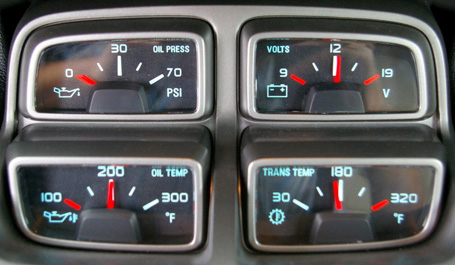
Some cars have other gauges too. Generally speaking, the needle on most of these other gauges should be near the middle of the gauge when the vehicle is operating normally. Depending on the gauge, it will usually have a red mark on one or both sides of the gauge, indicating trouble if the needle reaches that mark.
Some of these gauges take a few minutes to settle near the center, particularly the various temperature and pressure gauges that may appear in some vehicles.
These are called center normalized gauges and have been a popular gauge design standard for a long time. With so many in-car distractions, simplifying gauge design makes it easy to identify a problem.
In racing some drivers even tape over the sides of the gauges, leaving on the center visible — then they can only see the needle when it is in the center position, making it even easier to identify a problem.
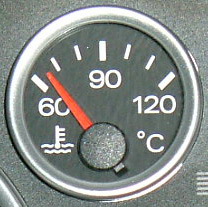 One of the most popular additional gauges is the engine coolant temperature gauge. It is identified by a symbol that looks like a thermometer partially submerged in liquid. This gauge indicates when your engine is overheating.
The following gauges are not exactly warning gauges, so they’re exempt from the center normal rule: speedometer (mph or km/h), tachometer (rpm), fuel, and turbo (boost).
Of course, not all cars use center normal gauges, but you’ll be able to tell a few minutes after your car has been running normally.
Broken Secrets
Subscribe on: Facebook | Twitter | Kindle
Sources: Answers.com, umich.edu
Photos: Photo courtesy of Aaron Gold at _cars.about.com_, rastrus (cc)


 Broken Secrets