Posts filed under ‘ProTips’
Shop at Off-Peak Hours for Time Savings
I’ve said it before, I love bananas. But there is one kind of bananas I do not like, busy grocery stores!
I went to my local supermarket yesterday to pickup a few things. Being Super Bowl Sunday, it was pretty much the worst day to go grocery shopping. Normally, I would just go another day but I needed some things for later in the day (like most other people there I’m sure).
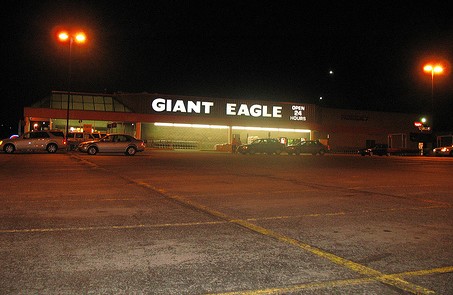 All the cart bumping and line shoving could have been avoided if I just went early in the morning or late the night before. That’s what I usually do — try to go shopping around 8pm-9pm, that includes any stores that are open late (ex. Target). Many stores are now until 10pm and some are open 24 hours. I try to take advantage of these hours since I usually get the store to myself. It actually makes shopping peaceful and efficient. (more…)
Sarcastic Secret: The Left Lane is for Passing
This is another one of those things that shouldn’t be a secret, but every time I go on the highway it seems like nobody knows about it.
I assume all my readers are perfectly safe drivers, only driving in the left lane when they need to pass another car, or in gridlock when proper traffic flow isn’t possible anyway. But if you know someone who blocks the left lane then you can share this with them as a subtle hint. Oh, and if someone shared this with you, they probably think you hate left lane bandits just as much as them.
We are constantly reminded by highway signs that say, “slower traffic keep right.” But, it’s not just the law, it’s common courtesy — we all need to share the road.
Keeping the left lane clear is important. Not just because it’s the other driver’s right to pass you, but because it is safer. When everyone plays by the same road rules, then everything is more predictable, there are fewer surprises and fewer accidents — that’s why these laws exist, they’re not just for fun.
One of these laws, at least in North America, is to pass on the left. If everyone did this, you would never have a car approach you from behind on your right side. Which, isn’t a big deal if you’re going to make a planned lane change, if you didn’t notice the car approach then you would see them when you check your blind spot anyway. But, if you need to make an emergency maneuver, it’s nice to be able to count on the fact that nobody will be there and you’ve got a safe “Plan B.” (more…)
How to Accelerate and Slow Banana Ripening
I love bananas.
They are a nearly perfect fruit. They taste great. They’re fairly inexpensive. They have their own protective skin and they contain many nutrients such as: vitamins A, B1, B2, B3, B5, B6, B9, C, Calcium, Iron, Magnesium, Phosphorus, Potassium and Zinc.
But, if I had to register a complaint about bananas, it would be their shelf life. Keeping them perfectly ripe is a fine art — one worth mastering.
The first trick is something my wife, Kristen, taught me: don’t buy all your bananas from the same bunch! Pick a couple green ones and a couple that are ripe/near ripe. Then you have some you can eat right away and others that will be ripe when you’re ready for them.
The interesting part is that those two bunches are likely the same age. You assume the less ripe ones are newer, but the food distributors control ripeness. They have large, air tight banana ripening vaults that give them very precise control over banana ripening. They’re usually divided into multiple sections, so bananas can be kept at different stages of ripeness. If they’re selling a lot of bananas, they can accelerate the ripening so they will be ripe when they arrive at the store. If sales are slow, they can slow ripening to avoid waste.
How do they do that? (more…)
How to Fold a Fitted Sheet
There are not many household items that are more frustrating than elastic border fitted sheets. On the bed, they work great. In the closet, they’re a nightmare.
Trying to fold a fitted sheet is the adult version of the kids toy that teaches you a square peg doesn’t fit in a round hole. It’s designed to test patience, induce anxiety and destroy self-confidence.
Folding a deformed oval into a tidy rectangle is not meant to happen. The closest I ever got was a triangle and I was pretty happy with it. Usually, it’s a big mess that doesn’t fit the description of any defined shape. Conveniently, that makes it very easy to spot in the closet when you need it. (more…)
How To Make Your Laptop Battery Run Longer
When your laptop is new, you can run on battery power for hours! But, as the battery gets older it doesn’t hold a charge like it used to. Ideally, you would just buy a new battery, but laptop batteries are expensive. From the manufacturer, they range from $80 to $150. Aftermarket batteries are often 50% – 70% of the manufacturer’s price. I’d recommend searching eBay or Amazon for new aftermarket batteries.
If you buy a new battery, keep your old one. I used to travel almost every week for work and I always had a second laptop battery with me. At times, the second battery was old, and only ran for 45 minutes, but that was a lifesaver on an airplane when you’re trying to finish some work (or watch the end of a movie you brought).

I usually buy the aftermarket batteries and never have problems with them. I did have a problem with an aftermarket power supply cord once; it died after three months. But, even with that $13 loss, buying aftermarket laptop accessories has saved me a lot of money over the years.
If you travel a lot, a second power cord is paramount. You should have one that you always leave in your computer bag, that way it’s impossible to leave behind when you travel. Have you ever tried to find a computer power cord at a retail store? If you are lucky enough to find one, it’s going to cost at least $60. If you can’t find one, and you need one for work — it’s a disaster. (more…)
Your Eyes Adapt to Darkness In 20-30 Minutes
If you’ve shopped for an HDTV, you’ve probably seen something on the spec sheet called “contrast ratio.” Contrast ratio is the difference between the darkest and brightest picture a TV can produce. Contrast is important to a good picture.
 That’s because our eyes can recognize a contrast difference of 1,000,000,000:1. That means, the brightest thing our eyes can see is a billion times brighter than the darkest thing. Good contrast to your eyes is like a gourmet meal for your taste buds. Contrast adds a lot of detail to the picture and ultimately immerses you in the action.
Unfortunately, when shopping for TVs, contrast ratio is almost meaningless. It could be really useful, but all of the manufacturers measure this number differently and then call it the same thing — it’s really only useful when comparing two TVs from the same manufacturer.
Imagine you want to buy a new car: you are cross shopping three manufacturers who measure fuel economy in three different ways. The first one, measures fuel economy while driving down a hill, while the other two measure it on flat land and while driving up a hill. Obviously, you can’t compare the results of those tests. But, if you’re looking at two cars from the same manufacturer then there is some comparative value to those numbers, even though they may not be accurate in a typical situation.
Thankfully, our eyes are extremely sensitive to contrast. Turn both TVs on and look at a flat black image for a while. A flat black image makes it easy to spot variations in darkness (aka “banding”), no banding should be present in a good TV. If you still can’t tell the difference and they both look good, then the difference is too small to worry about. Trust your eyes, they are incredible instruments.
It takes 20-30 minutes for your eyes to adjust from one extreme to the other because the contrast ratio is so high. If you’re in bright sunlight and then walk into a very dark room, it will take 20-30 minutes before you can see your best in that room. If you are in a moderately bright room and go into a very dark room, it is often closer to 15 minutes.
 The rods and cones in your eye are tested during dark adaptation. Rods are more sensitive to light and take longer to adjust. Cones are much faster to adjust, often in approximately 9 minutes. People over the age of 50 need twice as much light to see as well in the dark as a 30 year old. So, if you need more light, consider my CF light secret.
Frequent fliers will eventually notice that the aircrew dims the airplane’s interior lights on final approach during night landings . They want your eyes to be adjusted to the darkness outside in case the landing does not go as expected and you have to evacuate the plane.
Broken Secrets
Written By: Chad Upton
Available on Kindle
.
Sources: Why Planes Dim Interior Lights, Adaptation (Eye), Contrast Ratio, Growing Older
How Do You Solve a Rubik’s Cube?
When you bought your Rubik’s cube, it was already solved. If you just left it alone, you wouldn’t have to solve it. I’m just saying.
Of course, we all know it’s impossible to leave it alone. You have to mess it up. At first, you turn a couple rows and then turn them back. Then you turn a few more and a few more again and eventually, you can’t get it back! Now, you have to actually solve the puzzle.
 To make a short story long, you’ll try to solve it by working very little over a long period of time.
Rubik’s cube will sit on your shelf for a few days before you try it again. Over the next six months it will get picked up by a few smartypants friends who want a crack at it. After another year, you may pick it up and work on it for a short time, maybe even get one or two sides complete. Again, you’ll put it down for the next rainy day. It will seem like you’ve worked really hard on it, but you haven’t. Still, there comes a time in every cube owner’s life when they decide it needs to be solved, at any cost.
From my experience, there are three approaches to solving a Rubik’s cube.
I learned the first strategy from my brother when we were children. Every time we visited my Grandfather, he’d be working on his cube. On one visit, our small minds were blown when we realized he solved the cube. As I already stated, it’s impossible not to mess up a solved Rubik’s cube, and that’s especially true when it belongs to someone else.
When my grandfather realized we unsolved the Rubik’s cube, he told us that we’d have to re-solve it before we left. He was serious, or at least we thought so at the time. My brother’s solution, which I thought was pretty clever: peel off all the colored stickers and reapply them on matching sides. Although we got all the colors in the right places, it was still a big mess — similar to our paint-by-numbers work.
These days, I’d consider that cheating. But, it’s a good strategy to be aware of, you never know when you’ll be in a hostage situation that is one Rubik’s cube away from freedom.
The second approach comes in true internet style: have your computer solve it for you! Your computer is probably smarter than you anyway, why let that talent go to waste?
There are a number of web-based Rubik’s cube solvers. Basically, you paint the onscreen Rubik’s cube to look like yours and it generates a list of moves required to solve it. Click here for one that I have vetted. It works on the traditional 3 x 3 cube, and also on the newer 2 x 2 and 4 x 4 cubes. This is still cheating. But, it’s much less detectable than relocating the colored stickers.
Finally, the official approach, sanctioned by Rubik himself. This is the cross, corner, middle, top, corner method. It’s a combination of moves that systematically solve the cube. Once you know these moves, you can solve any cube. For the complete tutorial, click here.
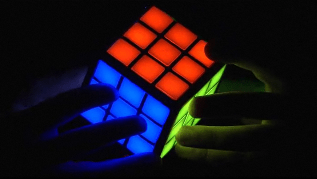 The original 3 x 3 cube is a classic. But, they have released many different versions of the Rubik’s cube and similar puzzles. There is even a touch screen Rubik’s cube called the TouchCube. Click on the picture to check it out.
Broken Secrets
Written by: Chad Upton
[Available on Kindle]
Google Provides Free 411 Searches and Connections
Google has a lot of cool services that most people don’t know about. One of my favorite Google secrets is Google 411.
Just dial: 1-800-GOOG-411
It is just like your local telephone company’s 411 service, except it’s free and it automatically connects you to the number for free. It works from US or Canadian phones and can be used to find US and Canadian business listings.
It also has some cool features. When you find a listing, you can say “text message” and Google will instantly text you the phone number, address and a map link for the address that opens in Google maps on a capable phone.
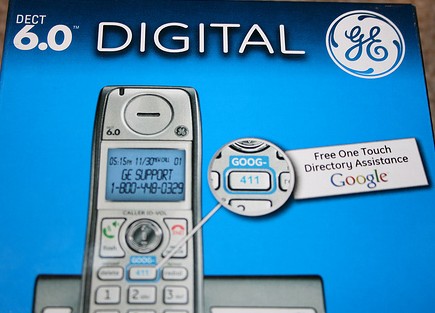
There are even cordless phones available with a dedicated button for Google 411.
Remember goog-411 the next time you need to make dinner reservations or order takeout — it couldn’t be easier or cheaper.
BrokenSecrets.com [available on kindle]
Photo: morrowplanet (cc) | Source: Google 411
Colored Sunglass Lenses Can Improve Your Sight
 Let me be clear, they don’t improve the focusing power of your eyes but they can change the way things look so you recognize them more easily. That’s important when reaction time is critical.
Yellow lenses are a popular option but it’s a myth that they make things brighter — they do not amplify light. But, according to the American Academy of Ophthalmology, they do enhance depth perception. This is because they block some of the blue light that can make objects look hazy and reduce sharpness.
For this reason, yellow lenses are popular with pilots, cyclists, shooters and boaters in low light. In daylight, blue lenses are good for pilots and skiers because they enhance the contrast between objects that are white (snow and clouds) and other objects. For boaters, red lens are good because they increase the contrast between water and objects that are in the water.
Although colored lenses can increase contrast in specific conditions, the downside with any colored lens is that they obviously distort color. Brown colored lenses are the happy-medium; they offer minimal color distortion while improving contrast, so they’re great for everyday use.
BrokenSecrets.com
Big thanks to Todd for sharing this secret with me!
Automatically Add WWW. and .COM to a Website Address
Because I spend so much time on the internet, I have bookmarked hundreds of websites, maybe thousands. They’re neatly organized into folders by category, some of them 8 folders deep. But, I rarely see anyone else use bookmarks — I know that you’re typing in the address for many of the sites you visit.
This secret will save you some keystrokes.
Instead of typing “www.BrokenSecrets.com” and then hitting enter, just type “BrokenSecrets” and press CTRL+ENTER (Mac users use COMMAND + RETURN). That will automatically add “www.” to the beginning and “.com” to the end.

For those who have no idea what I’m talking about, look at the top of your web browser (the program you’re using to view this site). You’ll see a text input area that starts with, “http://brokensecrets.com”. That is where you can type web addresses that you’d like to visit. For most sites, you need to at least type the address and the extension (ex: brokensecrets.com).
In Windows, this works with: FireFox, Internet Explorer and Chrome. On Mac, this works with FireFox and Chrome, but use CTRL + RETURN for Chrome. It does not work in Safari for Mac or Windows.
BrokenSecrets.com
Subscribe on your Kindle


 Broken Secrets