Posts filed under ‘Computers and Internet’
Extend the Life of Printer Ink Cartridges
If you’ve got an ink jet printer then you’re likely spending a lot of money on ink. Most of these printers use expensive and sophisticated ink cartridges. These cartridges monitor usage and estimate the amount of ink remaining. The estimate is usually conservative, meaning it indicates you are out of ink before you’re really out of ink.

If you reset this memory then you can keep printing until the cartridge is actually empty. Depending on the brand and model of cartridge, this reset is actually really easy. If you look above the small circuit board on the cartridge, there is sometimes a pinhole reset button, kind of like the paperclip eject hole on most cd rom drives.
Check out the following video to see a demonstration.
I should also note that not all cartridges can be reset in this way. Here are a couple of sites that show other methods of resetting some cartridges.
Doing a cartridge reset is also useful if you refill your own cartridges, since the cartridge may report that it’s empty even after you refill it. If you do a lot of color printing, you may consider generic cartridges or even a continuous ink system:

I should also mention that laser printers have become extremely cheap. I rarely print in color, so a black and white laser printer is very cost effective for me. When I need to print photos, there are lots of drug stores or department stores that do a great job for a low price. If I need to print color documents, there are many great places to get that done at a reasonable price too. With a $100 laser printer, you’re often able to print thousands of pages of text on the toner cartridge that is included.
Big thanks to Derek Santos for sending the video and inspiring this post.
Broken Secrets | Facebook | Twitter | Email | Kindle
The Space Bar Scrolls Down in Your Browser
This is an awesome week and I mean that figuratively. The Book of Awesome arrives in stores this Wednesday and I wanted to celebrate by sharing some broken secrets from the website 1000AwesomeThings.com.
One of my favorite “Awesome Things” is “Learning a new keyboard shortcut.” Since I’m talking favorites, I want to share one of my favorite keyboard shortcuts: the space bar.

If you’re reading this in a web browser or you do a lot of reading on the web, this is one shortcut you should learn before all others. To scroll your browser down exactly one page, press the space bar. To scroll up one page, hold shift while you press the space bar.
It’s that simple, happy reading.
Broken Secrets
Written By: Chad Upton
Photo: jakebouma (creative commons)
Keeping Headphones Untangled
Walking, flying, train and bus riding — these are some of the most inane, meaningless and repetitive activities that you may do. Many people do them everyday, even twice or more. Headphones, and the devices they’re connected to, make these activities more enjoyable, memorable and sometimes even meaningful.
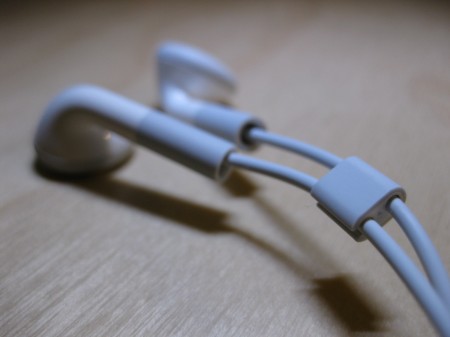
I’ve spent my fair share of time commuting in planes, trains and automobiles, but few of these experiences were memorable. Even fewer were memorable in a good way. But, I’ll never forget the bus ride when I first listened to the song, “I Will Follow You Into The Dark” by Death Cab for Cutie. I had played the song dozens of times before, but this was the first time I really listened to it. (more…)
Improve Monitor Picture Quality in 15 Seconds
In a previous post, I wrote about properly cleaning LCD screens on televisions and monitors. That article will help you keep the screen clean, but what about the electronics inside?
You may already defragment your hard drive to keep it tidy and reduce its workload, but there is a secret the LCD manufacturers don’t want you to know about — your monitor needs similar treatment to perform its best.
 There are a few websites that can run scan patterns across your screen to achieve 100% pixel defragmentation. It takes about 15 seconds to complete and you’ll have a noticeably better picture on your screen.
Bookmark the following site because you should do this about once a month: click here to use it.
[THIS POST WAS THE 2010 APRIL FOOLS’ POST]
Broken Secrets
Written By: Chad Upton
Follow BrokenSecrets on Twitter
Save Your Wet Electronics by Sticking Them in Rice
Simply put, when you make rice, you take 1 cup of rice and pour at least a cup and a half of water into it. Then you put it on the stove for a while and when you’re done, there’s no more water — it’s in the rice!
The point is, rice is really good at absorbing water.
So if you drop your cell phone in a bucket of water, toilet or swimming pool: get it quickly; turn it off; dry it and immediately put it into a bag of uncooked rice.
If you can access the battery, you should take it out too since some devices, especially cell phones, are still consuming power on standby, even when they appear to be off.

If you’ve got a wet vacuum, like a shop-vac, you should use it to suck some of the water out. A friend of mine (you know who you are) spilled water on my laptop keyboard once. I flipped the laptop upside down immediately, turned it off and pulled out the battery. It set it down and ran to get the shop-vac. While keeping it upside-down, I sucked all the water out of the keyboard. (more…)
Caller ID Can Be Hacked
If you rely on caller ID to screen calls, you should be aware that the number you see cannot always be trusted.
There are a few services available that let people choose the caller id number that appears when they make a phone call.
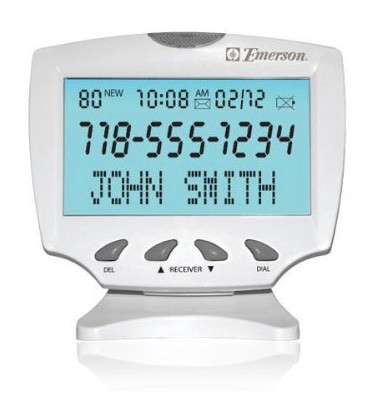
Telemarketers and collections agencies are not allowed to change their number, but some still do.
I share this secret because caller id spoofing is becoming popular among fraudsters. You should be weary of any caller asking you for something, especially money or personal information. If a caller claims to be from your financial institution or another company that requires personal information, ask them some information that confirms they are who they say they are. For example, if it’s your cell phone company, ask them which calling plan you’re on.
How to Get the Best Price When Shopping Online
The internet has completely changed bargain hunting and finding the best price couldn’t be any easier.
I like to use Google products (formerly known as “Froogle”). It compares prices at thousands of retailers and show you the best deals along with ratings for each retailer.
Google products also searches sites like ebay. Although, it’s worthwhile checking ebay independently, there are lots of auctions for new products or if you’re willing to take a used one then you’ll get a great deal. If you’ve looking for something that doesn’t ship well, such as appliances, be sure to check craigslist.org or kijiji.com (owned by ebay). They let you search for products in your area so shipping is not necessary.
Sometimes the best price is at a website you’ve never heard of. This is when customer ratings and common sense are really helpful. If you’ve never heard of the retailer and can’t find a phone number for the office on the site, then I probably wouldn’t order from them. Amazon might be the only exception to this and in fact they’re one of my favorite online retailers, they frequently have the best price and their shipping and customer service are great.
If you’re searching for cameras, be weary of small companies based in New York City. They usually have the best price on camera equipment, but there are lots of online horror stories about some of these companies.
Rescue a Disc From Your CD Drive With a Paperclip
Most CD/DVD drives in computers have a secret eject button. It allows you to open the CD drive when a disc gets stuck and cannot be ejected normally. It’s also helpful if you need to remove a disc and you don’t want (or have time) to power up the computer — the force eject works without power.
You’ll need a thin sturdy object to operate the manual eject, a straightened paperclip works well. In rare cases, the hole will be slightly smaller than a paperclip and a sewing needle will be required.
Look for a round hole on the face of the CD drive that is just large enough to feed a paperclip through. The following photos show the manual eject hole on a desktop and laptop CD drive.
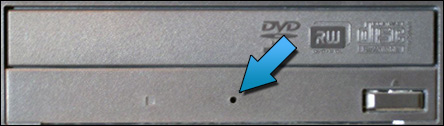
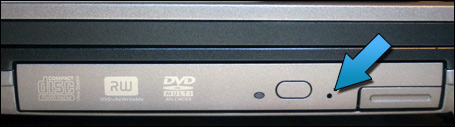
Once you have found the hole, push a straightened paperclip through the hole and when you feel it stop, push a little harder and it should push open the motorized drive tray (desktop) or release the drive lock (laptop).
If you’ve got a Mac, most new models have a slot load drive (there is no tray that the disc sits on, similar to most car CD players). Some of these drives are particularly bad at ejecting CDs with uneven edges (if yours does this then you’ll know what I’m talking about) and there is a paperclip method for these drives too. There is an Apple support document for this issue; you’ll have to click here to view it since I can’t use their material.
Maybe you’ve seen that hole and wondered what it was for, maybe not. Frankly, it doesn’t matter, because you know now and that’s what we do here.
Broken Secrets
Written By: Chad Upton
Available on Kindle | Share Your Secret!
How To Make Your Laptop Battery Run Longer
When your laptop is new, you can run on battery power for hours! But, as the battery gets older it doesn’t hold a charge like it used to. Ideally, you would just buy a new battery, but laptop batteries are expensive. From the manufacturer, they range from $80 to $150. Aftermarket batteries are often 50% – 70% of the manufacturer’s price. I’d recommend searching eBay or Amazon for new aftermarket batteries.
If you buy a new battery, keep your old one. I used to travel almost every week for work and I always had a second laptop battery with me. At times, the second battery was old, and only ran for 45 minutes, but that was a lifesaver on an airplane when you’re trying to finish some work (or watch the end of a movie you brought).

I usually buy the aftermarket batteries and never have problems with them. I did have a problem with an aftermarket power supply cord once; it died after three months. But, even with that $13 loss, buying aftermarket laptop accessories has saved me a lot of money over the years.
If you travel a lot, a second power cord is paramount. You should have one that you always leave in your computer bag, that way it’s impossible to leave behind when you travel. Have you ever tried to find a computer power cord at a retail store? If you are lucky enough to find one, it’s going to cost at least $60. If you can’t find one, and you need one for work — it’s a disaster. (more…)
Your Eyes Adapt to Darkness In 20-30 Minutes
If you’ve shopped for an HDTV, you’ve probably seen something on the spec sheet called “contrast ratio.” Contrast ratio is the difference between the darkest and brightest picture a TV can produce. Contrast is important to a good picture.
 That’s because our eyes can recognize a contrast difference of 1,000,000,000:1. That means, the brightest thing our eyes can see is a billion times brighter than the darkest thing. Good contrast to your eyes is like a gourmet meal for your taste buds. Contrast adds a lot of detail to the picture and ultimately immerses you in the action.
Unfortunately, when shopping for TVs, contrast ratio is almost meaningless. It could be really useful, but all of the manufacturers measure this number differently and then call it the same thing — it’s really only useful when comparing two TVs from the same manufacturer.
Imagine you want to buy a new car: you are cross shopping three manufacturers who measure fuel economy in three different ways. The first one, measures fuel economy while driving down a hill, while the other two measure it on flat land and while driving up a hill. Obviously, you can’t compare the results of those tests. But, if you’re looking at two cars from the same manufacturer then there is some comparative value to those numbers, even though they may not be accurate in a typical situation.
Thankfully, our eyes are extremely sensitive to contrast. Turn both TVs on and look at a flat black image for a while. A flat black image makes it easy to spot variations in darkness (aka “banding”), no banding should be present in a good TV. If you still can’t tell the difference and they both look good, then the difference is too small to worry about. Trust your eyes, they are incredible instruments.
It takes 20-30 minutes for your eyes to adjust from one extreme to the other because the contrast ratio is so high. If you’re in bright sunlight and then walk into a very dark room, it will take 20-30 minutes before you can see your best in that room. If you are in a moderately bright room and go into a very dark room, it is often closer to 15 minutes.
 The rods and cones in your eye are tested during dark adaptation. Rods are more sensitive to light and take longer to adjust. Cones are much faster to adjust, often in approximately 9 minutes. People over the age of 50 need twice as much light to see as well in the dark as a 30 year old. So, if you need more light, consider my CF light secret.
Frequent fliers will eventually notice that the aircrew dims the airplane’s interior lights on final approach during night landings . They want your eyes to be adjusted to the darkness outside in case the landing does not go as expected and you have to evacuate the plane.
Broken Secrets
Written By: Chad Upton
Available on Kindle
.
Sources: Why Planes Dim Interior Lights, Adaptation (Eye), Contrast Ratio, Growing Older


 Broken Secrets