Posts filed under ‘Be Frugal’
Google Provides Free 411 Searches and Connections
Google has a lot of cool services that most people don’t know about. One of my favorite Google secrets is Google 411.
Just dial: 1-800-GOOG-411
It is just like your local telephone company’s 411 service, except it’s free and it automatically connects you to the number for free. It works from US or Canadian phones and can be used to find US and Canadian business listings.
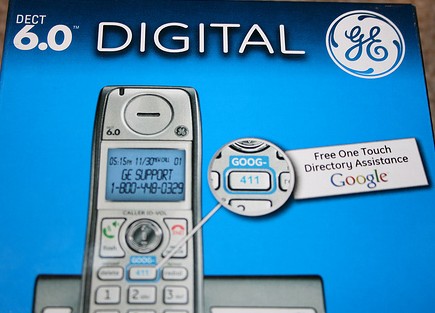
It also has some cool features. When you find a listing, you can say “text message” and Google will instantly text you the phone number, address and a map link for the address that opens in Google maps on a capable phone.
There are even cordless phones available with a dedicated button for Google 411.
Remember goog-411 the next time you need to make dinner reservations or order takeout — it couldn’t be easier or cheaper.
BrokenSecrets.com [available on kindle]
Photo: morrowplanet (cc) | Source: Google 411
How to Get Free HDTV Channels
When I say free, I don’t mean free with your paid cable or satellite package. I mean 100% free without paying for any service.
When television broadcasting began in North America, the broadcasts were completely free. The costs associated with producing TV were covered by program sponsors (advertisers). TV signals were received over the air, so all you needed was a television and an antenna (aka “rabbit ears”). This worked great at the time because TV was new and nobody knew if it was going to be successful; laying cable to distribute signals didn’t make any sense and satellites weren’t an option yet.
Once television was a proven success, viewers wanted more content on bigger and better televisions. Today, those demands haven’t changed, but the technology has.
Receiving signals over the air was not perfect, there were a limited number of channels that could fit in the airwaves. Reception was spotty, but Cable and Satellite services came along with more channels and reliable signals that didn’t require any adjustments.
The technology has changed again. The development of digital signals has allowed broadcasters to fit many channels in the same space that used to only fit one channel. Although it caused a lot of disruptions in June of 2009, the United States ceased all analog TV signals within a specific frequency range. That means the once crowded airwaves are much more useful with digital signals that can stuff more channels in the same space.
Some broadcasters have been distributing their television signal over-the-air for more than 50 years and they continue to do so, now in digital. The secret to picking up these free channels: rabbit ears.
Seriously.

To many people, this will sound like a huge step back, and in some ways it is. You’re not going to find John and Kate or Jersey Shore on the free channels, but it could be worse: you might find John and Kate or Jersey Shore on the free channels.
If you’re on a budget; or you only watch the most popular network shows; or you want to stick it to the cable-man; or you want to pickup really good HD signals on a TV without a cable box or satellite receiver, then this is an option to consider. In many cases, digital over-the-air signal quality rivals cable and satellite signals, where signals are highly compressed because of bandwidth limitations.
Digital rabbit ears are much better than the coat hangers of the past — if you’ve upgrade to a digital cordless phone in the past couple years, you’ll understand the difference in reception, reliability and clarity that digital signals offer.
Depending on where you live, your channel selection will vary. In some places, you can get 10+ HD channels and dozens of standard digital channels, all for FREE! If you live in the United States, you can enter your zipcode in AntennaWeb’s search engine to see a list of the channels you should receive. In many places, you should get most (or all) of your favorite prime time shows in free HD. All you need is an HDTV, an ATSC tuner (most HDTVs have one built in) and an antenna. Here are some examples of affordable indoor and outdoor antennas that you can buy.
BrokenSecrets.com [now available on Kindle]
Photo: Dano (cc)
Headphones Can Be Used As Microphones
You forgot your microphone at home and you’ve got an online meeting in five minutes. This secret might save you.
While it might be hard to come by a spare microphone, the ubiquity of mp3 players makes it easy to find a pair of headphones. If you plug headphones into the microphone input on your computer (or other electronics), you can speak into the LEFT headphone as if it were a microphone.
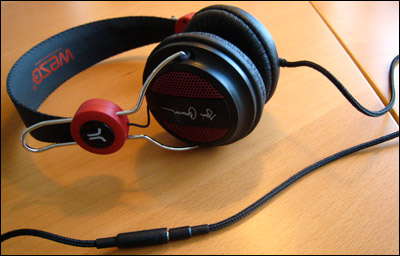
This might sound crazy, but this is possible because microphones and speakers (or headphones) are very similar. A microphone converts sound waves to electrical impulses while a speaker converts electrical impulses to sound waves. Although they do the exact opposite function, they actually use the same principle and components to do so.
In a microphone, the sound waves hit the diaphragm, causing it to vibrate at a specific frequency. A magnetic coil attached to the diaphragm moves with the vibrations which induces an electric current in the wires. This current is often converted to a digital signal to be recorded or sent across the internet.
A speaker works the exact opposite way. An electric current on a wire causes a coil to move; a diaphragm attached to the coil pushes air at a specific frequency which generates sound waves for your ear to pick up.
I discovered this secret a long time ago, when I lost the microphone for my Rap-Master Keyboard. I found a demo video you can check out:
BrokenSecrets.com
Photo Credit: steveyb (Creative Commons)


 Broken Secrets