Posts filed under ‘Around The House’
Some Rechargable Products Use Standard Batteries
I normally shave the old fashioned way, with shaving cream and a razor. Although, a couple times a week I use a rechargeable electric razor.
It doesn’t shave as close as a straight blade or cartridge razor, but it does shave time off my morning routine. It’s an easy way to catch up when I’m running behind or anxious to get working earlier.
I’ve had the same electric razor for about 10 years. I got it as a gift and it has worked really well, but its ability to hold a charge has degraded significantly since it was new. When it was new, I could travel for a week and not recharge it. Recently, it has required a charge after every use.
A couple weeks ago, it failed to run for more than a few seconds. I charged it again, and had the same result.
The internal rechargeable battery had finally failed. (more…)
You Can Buy Your Own Dental Tools
A couple weeks ago, I mentioned that you can buy your own tamper proof screwdrivers. Ownership of tamper proof screwdrivers ups your do-it-yourself status to a new level; but, you can’t earn your DIY badge without having your own set of dental tools.
Maybe you’ve got a deep pocket in a molar that you can’t floss or brush clean, or maybe you just want to descale your pet’s gum line. 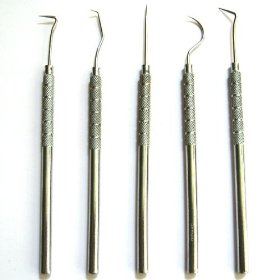
There are so many uses for dental tools. Hobbyists use them for carving, cleaning and hooking small objects. Technicians and mechanics may use them for removing tiny o-rings and gaskets. Perhaps you will use them to pick locks or scratch lotto tickets, poke the CD-ROM eject hole or spread glue in a hairline crack on the ceramic you broke last summer.
I found a 5 piece set on Amazon at a great price. Heck, for $2 (see “other sellers”), I’m not sure there is a more versatile set of tools for your toolbox. Best of all, you probably don’t own these tools yet and we all know it’s fun to get new tools.
Buying a new tool is like buying a new skill. It empowers you to put yourself in the way of new dangers and abstain from doing new things that you never dreamed of avoiding before.
So go ahead, have your popcorn and eat it too.
Broken Secrets
Written By: Chad Upton
PS – I’m really excited for fellow blogger Neil Pasricha’s new book: The Book of Awesome. Pre-order it now (or if you’ve been living under a rock and haven’t already, at least checkout the blog)!
Rescue a Disc From Your CD Drive With a Paperclip
Most CD/DVD drives in computers have a secret eject button. It allows you to open the CD drive when a disc gets stuck and cannot be ejected normally. It’s also helpful if you need to remove a disc and you don’t want (or have time) to power up the computer — the force eject works without power.
You’ll need a thin sturdy object to operate the manual eject, a straightened paperclip works well. In rare cases, the hole will be slightly smaller than a paperclip and a sewing needle will be required.
Look for a round hole on the face of the CD drive that is just large enough to feed a paperclip through. The following photos show the manual eject hole on a desktop and laptop CD drive.
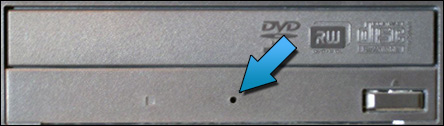
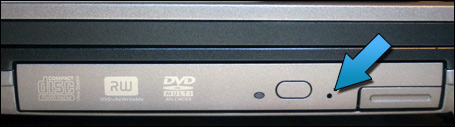
Once you have found the hole, push a straightened paperclip through the hole and when you feel it stop, push a little harder and it should push open the motorized drive tray (desktop) or release the drive lock (laptop).
If you’ve got a Mac, most new models have a slot load drive (there is no tray that the disc sits on, similar to most car CD players). Some of these drives are particularly bad at ejecting CDs with uneven edges (if yours does this then you’ll know what I’m talking about) and there is a paperclip method for these drives too. There is an Apple support document for this issue; you’ll have to click here to view it since I can’t use their material.
Maybe you’ve seen that hole and wondered what it was for, maybe not. Frankly, it doesn’t matter, because you know now and that’s what we do here.
Broken Secrets
Written By: Chad Upton
Available on Kindle | Share Your Secret!
The Meaning of the Numbers Inside the Recycling Symbol
By: Chad Upton | Editor
I remember going to the grocery store as a small child. It seemed like we were there for hours before finally packing all of our purchases into large brown paper bags. A few years later they phased out paper bags over concern for the trees required to make the bags. They were replaced with plastic bags and we have used them almost ever since. But, A few years ago, paper bags started appearing once again. Although they’re made from trees, those are pretty easy to grow compared to the raw materials of plastic.
It seems like everything is made from plastic now. I did a bit of dumpster diving tonight to find out how much. I went through my recycling bin looking for things with the recycling symbol on them — I guess that probably doesn’t really count as “dumpster diving.” These numbers only appear inside the recycling symbol on plastic products.
Plastic is a petroleum product, meaning the raw material used to create plastic is oil. It’s no secret that oil is one of the most in-demand natural resources and for a variety of reasons oil prices have sharply increased over the past 10 years. It’s not just the fuel companies who are affected by the increasing price of oil, but also plastic manufacturers. Both of these groups have to pass those increased costs on to their customers, and those businesses pass it on to their customers. Somewhere down the line, that customer is you and you’ve obviously noticed at the gas pump.
But, you may not have noticed the increase on plastic prices, at least not directly. Depending on where you live, you may have noticed a big or small push for you to use (or buy) reusable grocery bags. Of course these are great for the environment, but they also save the grocery store a lot of money on plastic bags, which have become significantly more expensive in the past few years. In some places, you even have to pay extra if you want plastic bags. (more…)
How to Accelerate and Slow Banana Ripening
I love bananas.
They are a nearly perfect fruit. They taste great. They’re fairly inexpensive. They have their own protective skin and they contain many nutrients such as: vitamins A, B1, B2, B3, B5, B6, B9, C, Calcium, Iron, Magnesium, Phosphorus, Potassium and Zinc.
But, if I had to register a complaint about bananas, it would be their shelf life. Keeping them perfectly ripe is a fine art — one worth mastering.
The first trick is something my wife, Kristen, taught me: don’t buy all your bananas from the same bunch! Pick a couple green ones and a couple that are ripe/near ripe. Then you have some you can eat right away and others that will be ripe when you’re ready for them.
The interesting part is that those two bunches are likely the same age. You assume the less ripe ones are newer, but the food distributors control ripeness. They have large, air tight banana ripening vaults that give them very precise control over banana ripening. They’re usually divided into multiple sections, so bananas can be kept at different stages of ripeness. If they’re selling a lot of bananas, they can accelerate the ripening so they will be ripe when they arrive at the store. If sales are slow, they can slow ripening to avoid waste.
How do they do that? (more…)
How to Fold a Fitted Sheet
There are not many household items that are more frustrating than elastic border fitted sheets. On the bed, they work great. In the closet, they’re a nightmare.
Trying to fold a fitted sheet is the adult version of the kids toy that teaches you a square peg doesn’t fit in a round hole. It’s designed to test patience, induce anxiety and destroy self-confidence.
Folding a deformed oval into a tidy rectangle is not meant to happen. The closest I ever got was a triangle and I was pretty happy with it. Usually, it’s a big mess that doesn’t fit the description of any defined shape. Conveniently, that makes it very easy to spot in the closet when you need it. (more…)
How To Make Your Laptop Battery Run Longer
When your laptop is new, you can run on battery power for hours! But, as the battery gets older it doesn’t hold a charge like it used to. Ideally, you would just buy a new battery, but laptop batteries are expensive. From the manufacturer, they range from $80 to $150. Aftermarket batteries are often 50% – 70% of the manufacturer’s price. I’d recommend searching eBay or Amazon for new aftermarket batteries.
If you buy a new battery, keep your old one. I used to travel almost every week for work and I always had a second laptop battery with me. At times, the second battery was old, and only ran for 45 minutes, but that was a lifesaver on an airplane when you’re trying to finish some work (or watch the end of a movie you brought).

I usually buy the aftermarket batteries and never have problems with them. I did have a problem with an aftermarket power supply cord once; it died after three months. But, even with that $13 loss, buying aftermarket laptop accessories has saved me a lot of money over the years.
If you travel a lot, a second power cord is paramount. You should have one that you always leave in your computer bag, that way it’s impossible to leave behind when you travel. Have you ever tried to find a computer power cord at a retail store? If you are lucky enough to find one, it’s going to cost at least $60. If you can’t find one, and you need one for work — it’s a disaster. (more…)
There Are Only 14 Possible Calendar Configurations
At the beginning of every year, I get a tropical island wall calendar. During the winter, it makes the days seem warmer; during the summer, it inspires me to enjoy the long sunny days.
 Until a few days ago, my January 2010 calendar was really small. I hadn’t bought a new calendar yet, so I was squinting at the tiny January 2010 layout in the corner of my December 2009 calendar.
If only I kept my 1999 calendar, I could have used that this year.
You see, there are only 14 possible calendar configurations. This year, January first was a Friday and next year, it’s a Saturday. In 2012 it’s a Sunday, but in 2013 it’s a Tuesday. (more…)
You Can Easily Buy Tamper Proof Screwdrivers
 I have a long history of taking things apart; as a Child I had a reputation for never putting them back together. There is some truth to that, but somethings are more fun in pieces.
Before I understood how they worked, I saw things as magic boxes. I wanted to know how the engineers solved all of the problems that made the product useful; what were their secrets?
As an adult, I still like taking things apart. Sometimes, I want to know how it works; other times it doesn’t work and I want to fix it, or break it further.
Unfortunately, it’s not always easy to disassemble things.
If you’re like me, you’ve probably tried to disassemble something and then realize you don’t own a screwdriver that can turn a triangular notched screw-head. Or, maybe you have noticed funny looking screw-heads in public restrooms. Not the people, the metal screws used on fixtures and cubical walls. If you don’t recognize the pattern on the screw-head, they’re likely what we call “tamper proof” screws. (more…)
Your Eyes Adapt to Darkness In 20-30 Minutes
If you’ve shopped for an HDTV, you’ve probably seen something on the spec sheet called “contrast ratio.” Contrast ratio is the difference between the darkest and brightest picture a TV can produce. Contrast is important to a good picture.
 That’s because our eyes can recognize a contrast difference of 1,000,000,000:1. That means, the brightest thing our eyes can see is a billion times brighter than the darkest thing. Good contrast to your eyes is like a gourmet meal for your taste buds. Contrast adds a lot of detail to the picture and ultimately immerses you in the action.
Unfortunately, when shopping for TVs, contrast ratio is almost meaningless. It could be really useful, but all of the manufacturers measure this number differently and then call it the same thing — it’s really only useful when comparing two TVs from the same manufacturer.
Imagine you want to buy a new car: you are cross shopping three manufacturers who measure fuel economy in three different ways. The first one, measures fuel economy while driving down a hill, while the other two measure it on flat land and while driving up a hill. Obviously, you can’t compare the results of those tests. But, if you’re looking at two cars from the same manufacturer then there is some comparative value to those numbers, even though they may not be accurate in a typical situation.
Thankfully, our eyes are extremely sensitive to contrast. Turn both TVs on and look at a flat black image for a while. A flat black image makes it easy to spot variations in darkness (aka “banding”), no banding should be present in a good TV. If you still can’t tell the difference and they both look good, then the difference is too small to worry about. Trust your eyes, they are incredible instruments.
It takes 20-30 minutes for your eyes to adjust from one extreme to the other because the contrast ratio is so high. If you’re in bright sunlight and then walk into a very dark room, it will take 20-30 minutes before you can see your best in that room. If you are in a moderately bright room and go into a very dark room, it is often closer to 15 minutes.
 The rods and cones in your eye are tested during dark adaptation. Rods are more sensitive to light and take longer to adjust. Cones are much faster to adjust, often in approximately 9 minutes. People over the age of 50 need twice as much light to see as well in the dark as a 30 year old. So, if you need more light, consider my CF light secret.
Frequent fliers will eventually notice that the aircrew dims the airplane’s interior lights on final approach during night landings . They want your eyes to be adjusted to the darkness outside in case the landing does not go as expected and you have to evacuate the plane.
Broken Secrets
Written By: Chad Upton
Available on Kindle
.
Sources: Why Planes Dim Interior Lights, Adaptation (Eye), Contrast Ratio, Growing Older


 Broken Secrets